
Automatic time tracking, for your whole day
September 4, 2026 · 6 min read
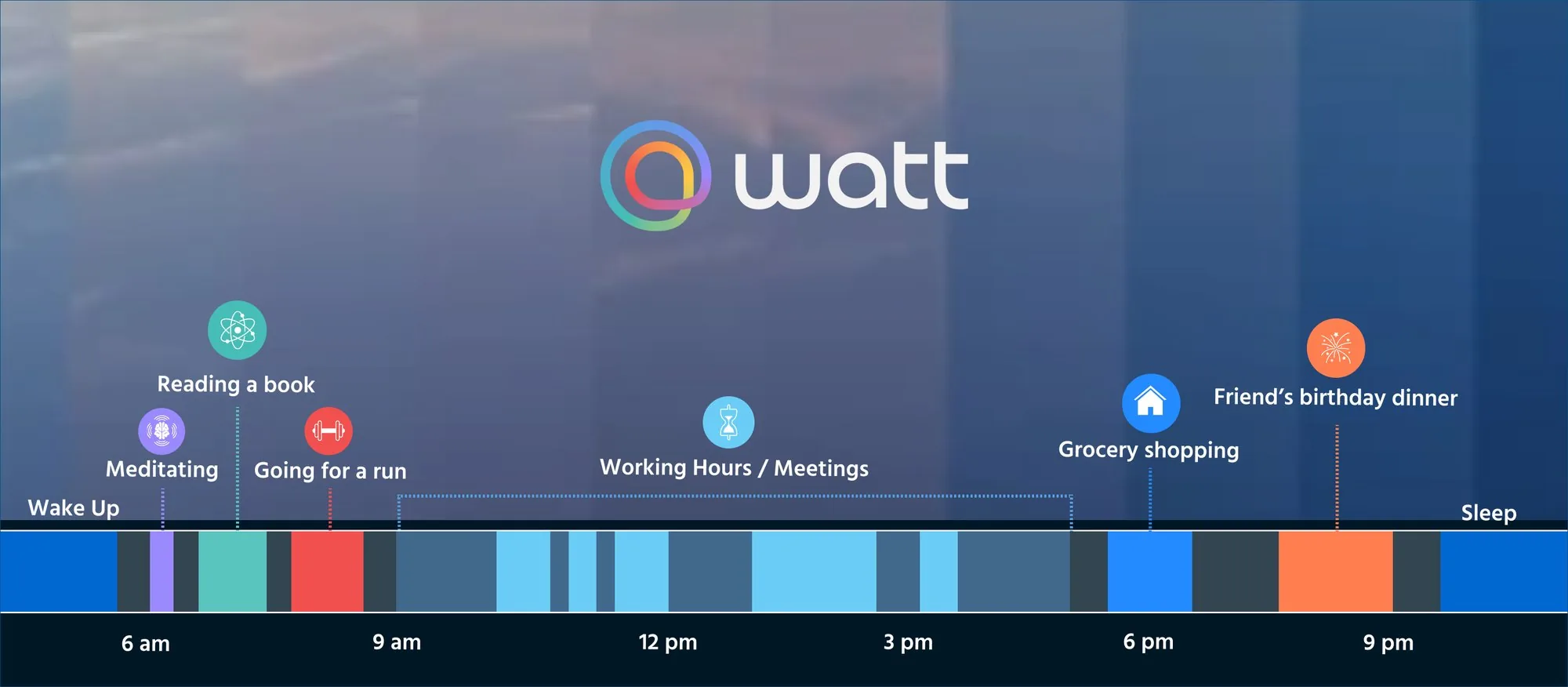
An automatic time tracker records how you spend your time without you starting or stopping anything. It sounds like a small convenience. It is not. The moment tracking stops depending on your memory, you finally get an honest picture of where your time goes, and that picture is the beginning of taking control of it.
Watt is an automatic time tracker built for the whole day, not just the hours you spend at a desk. This is what that means, how it works, and where it fits next to the trackers you may already know.
Why most time trackers only see your work
Almost every automatic time tracker works the same way: it runs on your computer and watches the apps, windows and websites you use. That is a good way to learn where your work hours go. It is also the reason those tools go dark the moment you close the laptop. Your run, your dinner with friends, the book you read, the seven hours you slept: none of it exists to a tracker that lives in your browser.
Manual trackers have the opposite problem. They can log anything, as long as you remember to press start, and then press stop. Nobody does that for their sleep.
So the picture most people have of their time covers a third of the day and none of the part that decides how they feel.
What Watt tracks instead
Watt does not watch your screen. It builds your day from three sources you already have.
Your wearable
Sleep, movement and recovery come from Apple Watch, Google Health, Oura, WHOOP, Fitbit, Garmin or Coros. This is what lets Watt log the night, not only the day.







Your calendars
Google Calendar, Outlook and Apple Calendar give Watt your scheduled work and life blocks, so a meeting, a class or a dinner lands on the timeline without you typing it.


Your locations
With your permission, the places where you spend time fill in the rest: the gym, the office, the café, home.
Together they cover sleep, work, exercise, learning, fun, mindfulness, upkeep, transit and the free time left in between, laid out on one timeline. No manual logging. It happens automatically. You cannot take control of time you cannot see, and for the first time you can see all of it.
From hours to a lifestyle
A list of hours is not the point. Health apps measure the results, Watt shows you the lifestyle behind them. It does that with three scores.
Busyness tells you how much of your waking time is occupied and how much free time you really have, day by day.
Balance looks at how you invest that free time across sleep, fun, mindfulness, learning and exercise, each with its own level, so you can see what is getting enough of you and what is not.
Vitality turns your sleep, movement and routine consistency into one score, so you can track how healthy your lifestyle is and watch it move as your habits do.
A busy day with a healthy split between work and life.
Balance drivers
Sufficient
7h14
/night
Meaningful
21%
of free
Limited
27m
Growing
2h10
Abundant
4h20
Vitality
Calculated today
Strong · Stabilizing
Rest, movement, and stability are trending together, keep the rhythm going.
Vitality drivers
Rest
Restored
+4 vs usual
Movement
Active
-2 vs usual
Stability
Stable
+3 vs usual
And because seeing is only half of it, Watt gives you tools for better days: block distracting apps automatically the moment work starts, use timed soundscapes for deep work, reading and meditation, and build your routine with reminders that make you more consistent.
Watt next to Rize, RescueTime and Toggl Track
Rize runs on Mac and Windows and automatically tracks the app, window and website you are using, then sorts your work by project and client. RescueTime does the same on the computer, adds iOS and Android apps, and includes Focus Sessions that block distracting sites. Toggl Track is built around timers, with optional background tracking and calendar import, and is made for timesheets and billing.
All three answer the question "where did my work hours go?" Watt answers "where did my day go, and what is it doing to me?" The facts side by side:
| Rize | RescueTime | Toggl Track | Watt | |
|---|---|---|---|---|
| Built for | Work and focus | Work and focus | Work, projects and billing | Your whole day |
| Captures time from | Apps, windows and websites | Apps and websites | Timers, optional app tracking, calendar import | Wearable, calendars and locations |
| Runs on | Mac and Windows | Desktop, iOS and Android | Web, desktop, mobile, browser | iPhone and Android, with your wearable |
| Covers sleep, movement and recovery | No | No | No | Yes |
| Turns time into | Work reports and focus scores | Productivity score and reports | Timesheets and reports | Busyness, Balance and Vitality |
| Wearable | Not used | Not used | Not used | Required |
| Price | From $9.99 a month | Free Lite plan, Premium $12 a month | Free plan, paid team plans | Free during public beta |
Prices as published by each vendor at the time of writing.
Many people run one of them for work and Watt for life. They are not competing for the same hours.
Why we built it
Time is your most valuable resource. The way you use it, spend it, invest it, share it, and waste it defines everything about your life. Your health. Your wealth. Your life satisfaction.
Watt is born to help you take back your time. To see it, plan it, and invest it however you want. To help you enjoy life, move, and grow. An automatic time tracker is simply the first step: you cannot invest what you cannot see.
Try Watt
Watt is free during the public beta, with no subscription, while we continue improving the product and testing useful tools. It needs a wearable: that is where your sleep, movement and recovery come from.
Your data stays yours. Watt protects it with industry-standard security and never sells it to anyone else. Work calendar access is deliberate and explainable, and IT teams can read exactly what Watt requests on our IT page.
Free during public BETA
Frequently asked questions
- What is an automatic time tracker?
- An app that records how you spend your time without you starting or stopping anything. Most watch the apps and websites on your computer. Watt builds your day from your wearable, calendars and visited locations, and sorts every hour into categories like sleep, work, exercise and free time.
- Is Watt really automatic?
- Yes. Once you connect your wearable, calendars and, if you choose, your location, Watt logs your day for you. You can edit any activity, but you never have to start a timer.
- Do I need a wearable?
- Yes. Watt is built around wearable data: your sleep, movement and recovery come from it. Supported: Apple Watch, Google Health, Oura, WHOOP, Fitbit, Garmin and Coros.
- Is Watt an alternative to Rize, RescueTime or Toggl?
- For tracking work hours on a computer, those tools do that job. Watt tracks your whole day from your body, your calendars and your locations, and turns it into Busyness, Balance and Vitality. People often use both.
- How is Watt different from other time trackers?
- Most time trackers only cover work hours and need manual input or a computer. Watt logs your whole day automatically, sleep included, and turns your sleep, movement and routine consistency into a Vitality score, so you see how your time connects to how you actually feel.
- How much does Watt cost?
- Watt is free during the public beta, with no subscription.